
Throughout this telecommunications series, we have examined how voice communication evolved from traditional telephone networks to VoIP, SIP, hosted PBX, Unified Communications, and intelligent call handling. The previous article covered intercom systems, which enable direct communication between people or locations. Paging serves a different need: delivering one announcement to a defined group, area, or building.
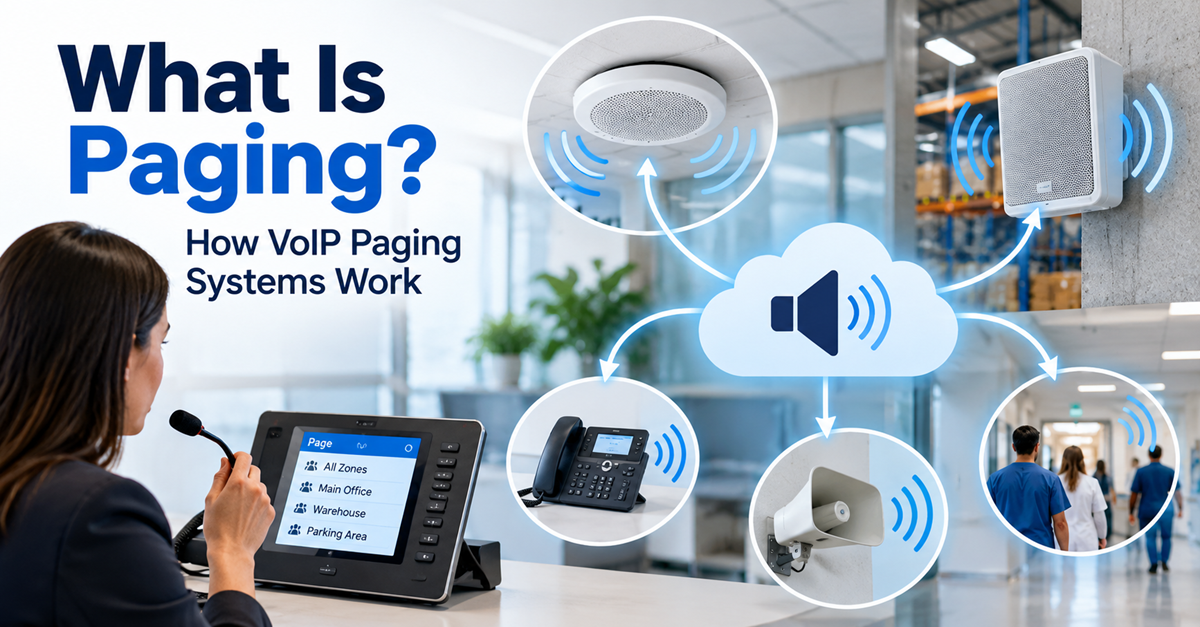
Paging remains widely used because it delivers time-sensitive information without requiring recipients to answer a call. Modern VoIP paging extends this capability to IP networks, where compatible phones, speakers, and software platforms can work together.
What is paging?
Paging is a communication method that delivers live or prerecorded voice announcements to one or more selected recipients or devices. It is commonly used to broadcast messages to groups of people across a department, building, or other defined area, without requiring recipients to answer a call.
In a business environment, a user may speak through a microphone, desk phone, IP phone, or application. The announcement then plays through assigned speakers, telephone speakerphones, or other compatible endpoints.
For example, a warehouse supervisor can announce that a delivery has arrived to a loading-bay zone instead of calling staff members individually. Schools, hospitals, factories, hotels, offices, retail sites, and transportation facilities use paging for similar purposes.
Paging differs from intercom communication. An intercom session is usually a two-way conversation between specific endpoints, while paging normally distributes audio without requiring an individual response.
A brief history
Early building paging relied on dedicated microphones, amplifiers, wiring, and loudspeakers. These public-address systems became common in large facilities where spoken messages needed to reach people across considerable distances.
The word paging is also associated with personal radio pagers. Those portable devices receive alerts or brief messages over radio networks, which made them valuable to mobile workers, especially in healthcare. Building-wide voice paging and personal pagers share a name but use different technologies.
As PBX systems became common, organizations could initiate company announcements from compatible telephones by dialing an extension or using a programmed key. Digital telephony and IP networking later enabled those announcements to travel through data networks rather than only through dedicated audio cabling.
How does a paging system work?
A paging system has three basic parts. The first element is the input source, such as a microphone, telephone, or software application. Secondly, there’s the audio-distribution method, such as an amplifier and speaker wiring, a PBX, or an IP network. And finally, there are the receiving endpoints, such as ceiling speakers, wall speakers, IP phones, paging adapters, or amplifiers.
A user selects a destination or paging group, speaks or triggers a message, and the system delivers the audio to the assigned endpoints. In a traditional analog installation, amplifiers and dedicated wiring distribute the sound. In an IP-based installation, network-connected endpoints receive the audio through the organization’s communications network.
What is VoIP paging?
VoIP paging uses Voice over Internet Protocol to distribute announcements over an IP network. Instead of relying entirely on separate analog audio wiring, a VoIP paging system can connect IP speakers, phones, gateways, and communication platforms through the organization’s existing network infrastructure.
A local paging deployment does not necessarily require public internet access. It can operate within a private local-area network, provided the network and endpoints are properly configured.
For example, an employee can use an IP phone to page a selected group. The phone system or paging platform identifies the group and sends the audio to its configured endpoints. Organizations may use unicast delivery, in which separate streams go to individual endpoints, or multicast delivery, in which one stream can be received by many listening endpoints.
How it works
The exact process varies by platform, but a typical VoIP paging workflow follows these steps:
- A user initiates a page from a phone, application, or control interface.
- The platform identifies the chosen paging group or zone.
- Where supported, SIP signaling establishes the paging session.
- The system distributes the live or prerecorded audio, commonly using RTP media streams.
- The selected endpoints automatically play the announcement through their speakers.
Consider an organization with three office floors. An administrator selects the second-floor paging group and announces a scheduled network-maintenance window. Only the devices assigned to that group receive the message unless the administrator chooses a wider zone or an all-call option.
Some platforms establish individual SIP sessions with receiving endpoints for unicast paging. In a multicast configuration, the network distributes a shared audio stream to multiple compatible endpoints. Multicast can reduce duplicated audio traffic in larger deployments, provided the network and devices support it. The appropriate delivery method depends on the communications platform, network architecture, and endpoint capabilities.
Paging zones and group announcements
A paging zone is a defined collection of endpoints that receive the same announcement. A zone may represent a physical area, such as a floor, department, warehouse section, or building. It can also represent an operational group that spans several locations.
A hospital, for example, may configure separate zones for admissions, facilities, and clinical departments. A manufacturer may create zones for production, storage, and administration. This helps staff target announcements and reduce unnecessary interruptions.
Many systems also provide:
- All-call paging, which sends an announcement to every configured zone.
- Priority paging, which allows designated messages to take precedence over routine ones.
- Scheduled announcements, where supported by the chosen platform.
- Visual alerting, which may complement audio announcements in noisy or accessibility-sensitive environments.
The precise features and behavior depend on the platform, endpoint models, and system configuration.
Paging and the PBX
The PBX has long connected business phones to paging equipment. In traditional systems, an employee could dial a dedicated extension or press a configured button to begin an announcement. The PBX connected the caller to an amplifier, speakers, or compatible telephones.
Modern IP PBX and hosted PBX platforms can offer comparable functions through IP speakers, paging groups, gateways, and compatible desk phones. Administrators may define zones, assign paging extensions, control access permissions, and manage receiving endpoints.
Compatibility matters. Some platforms support phone-to-phone group paging without separate hardware. Other implementations require an IP paging server, gateway, adapter, or dedicated speakers. Paging adapters can also help organizations retain existing analog amplifiers and speakers while integrating them with VoIP or Unified Communications platforms.
Intercom vs. paging
Intercom and paging systems are often deployed together, but they support different communication patterns.
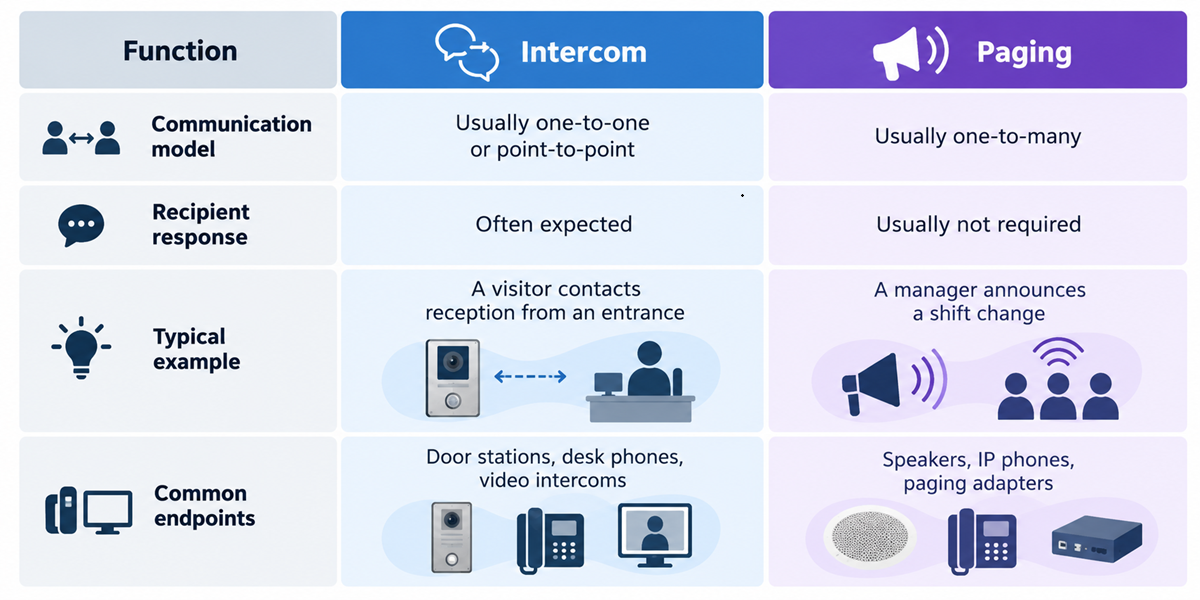
A compatible IP phone or communication platform may support both functions where its configuration and endpoints allow it.
Where are paging systems used?
Paging is useful wherever an organization needs to distribute information quickly to a defined group.
Schools may announce information to classrooms, corridors, or selected areas. Hospitals may communicate operational messages to staff and departments. Factories and warehouses may coordinate work across large physical spaces. Hotels, offices, retail environments, and transportation facilities may support internal communications or public announcements.
Paging can also form part of a broader emergency-notification strategy. However, a general-purpose VoIP paging system is not automatically a certified life-safety or voice-evacuation system. Emergency applications may require listed equipment, redundancy, monitoring, intelligibility standards, visual notification, and compliance with applicable local rules and building codes.
Benefits of VoIP paging
VoIP paging can offer several practical advantages when the network and endpoints are suitable:
- Use of existing IP infrastructure: Organizations may avoid building an entirely separate analog audio network.
- Centralized administration: Administrators can manage devices, zones, and configurations from networked systems.
- Scalability: Compatible endpoints and zones can often be added through configuration rather than extensive rewiring.
- PBX and UC integration: Employees may initiate pages from familiar phones or communications applications.
- Hybrid deployment options: Paging adapters can connect legacy analog amplifiers and speakers to IP-based systems.
- Workflow automation: Some platforms support scheduled messages, APIs, and integrations with operational software.
These outcomes depend on network capacity, system architecture, device compatibility, and the features provided by the selected vendor or platform.
Choosing a paging system
Choosing a paging system starts with understanding the organization’s communication requirements. Those requirements determine the equipment, network capabilities, and integrations needed.
- Define coverage. Identify whether announcements must reach one room, selected zones, an entire building, or multiple sites.
- Select endpoints. Determine whether the deployment needs IP speakers, analog speakers with gateways, desk phones, software clients, or a hybrid approach.
- Check compatibility. Confirm that the PBX, SIP platform, Unified Communications service, and endpoints support the intended paging method.
- Assess the available network. Review bandwidth, PoE availability, QoS policies, switch capacity, and multicast support if multicast paging is planned.
- Plan priorities and continuity. Decide which announcements take priority and how the system should operate during power, device, or network failures.
- Manage access. Set permissions so only authorized users can send routine, priority, or site-wide announcements.
- Prepare for maintenance. Larger deployments benefit from centralized configuration, endpoint monitoring, and clear documentation of zones and device locations.
The right paging system delivers intelligible audio to the intended people while fitting the organization’s network, operational priorities, and maintenance capabilities.
Paging in Unified Communications
Unified Communications brings voice, messaging, presence, conferencing, and related tools into connected communication environments. Paging can be integrated into that environment rather than operated as a completely separate announcement system.
For example, an employee may initiate a page from a desk phone while administrators manage compatible IP speakers and paging groups through connected communications tools. Some implementations can also connect paging with scheduling applications, building-management systems, or operational workflows.
This reflects the continuing evolution of telecommunications. Communication functions that once depended on isolated hardware can increasingly integrate with software-managed platforms.
Paging in the Voice AI era
Voice AI may extend paging capabilities when it is used with appropriate controls. An application could convert approved text into speech, create announcements from structured operational data, or trigger a message after a defined event.
For example, a logistics system might detect a delivery-status change and send an approved announcement to a specified warehouse zone. Speech recognition and natural-language controls may also simplify certain paging tasks.
Automated announcements require safeguards. Organizations should define authorization rules, review processes, privacy protection, and escalation procedures. This approach is particularly important where messages affect safety, security, or critical operations.
Why understanding paging matters
Paging adds a practical one-to-many communication capability to the telecommunications environment. Traditional phone systems connected people over distance. VoIP moved voice communication onto IP networks. PBX and Unified Communications platforms made communication services more flexible and software-driven.
With VoIP paging, organizations can distribute live or automated announcements through compatible devices. When it is properly designed, a paging system helps the right people receive important information without delay.
In the next article, we will explore another major capability in modern business communication: conferencing.


Leave a comment